Access in front of static sites
Static documentation generators do not log people in. They emit HTML, CSS, and a search index. Privacy is a hosting job: put an identity-aware reverse proxy on the hostname so unauthenticated requests never see those files.
This is the Dev-Centr pattern for member-only sister sites (and any other static host that must not be world-readable). Task steps: Protect a static site with Cloudflare Access.
Why not an app
A SolidStart (or Next, or Rails) rewrite would add sessions, user tables, and a deploy surface — and you would still put Access or equivalent in front of it. Antora already matches the public hub (Valentus, Lunr, AsciiDoc). Split public hub vs member hub at the playbook; do not split at the framework.
Per-page ACLs inside one site are the exception. Two playbooks (public vs private) are cheaper than app-level auth.
Where the lock sits
| Layer | Job |
|---|---|
Git forge |
Source stays in a private repo. That does not protect the built site. |
CI |
Build on the private repo (GitHub Actions still runs on free-plan private repos). Direct-upload the |
Host |
Cloudflare Pages, object storage, or any origin. Treat |
Edge |
Cloudflare Access (Zero Trust) on the orange-cloud hostname. SSO cookie; HTML never leaves the edge for strangers. |
Identity |
GitHub org, Google Workspace / Google accounts, or email one-time PIN. Access does not invent a second password database. |
flowchart LR
  visitor[Visitor]
  access[Cloudflare Access]
  idp[IdP: GitHub / Google / OTP]
  origin[Static origin]
  visitor --> access
  access -->|"no session"| idp
  idp -->|"Allow policy"| access
  access -->|"JWT cookie"| origin
Orange-cloud (proxied) DNS is required so Access can intercept the request. Grey-cloud to GitHub Pages cannot do this; that path is for public sites (GitHub Pages custom domain).
How Cloudflare learns GitHub org membership
Cloudflare does not scrape the GitHub org, and it does not keep a member roster of its own. GitHub answers at login. Access then stores that answer in a session cookie until the cookie expires.
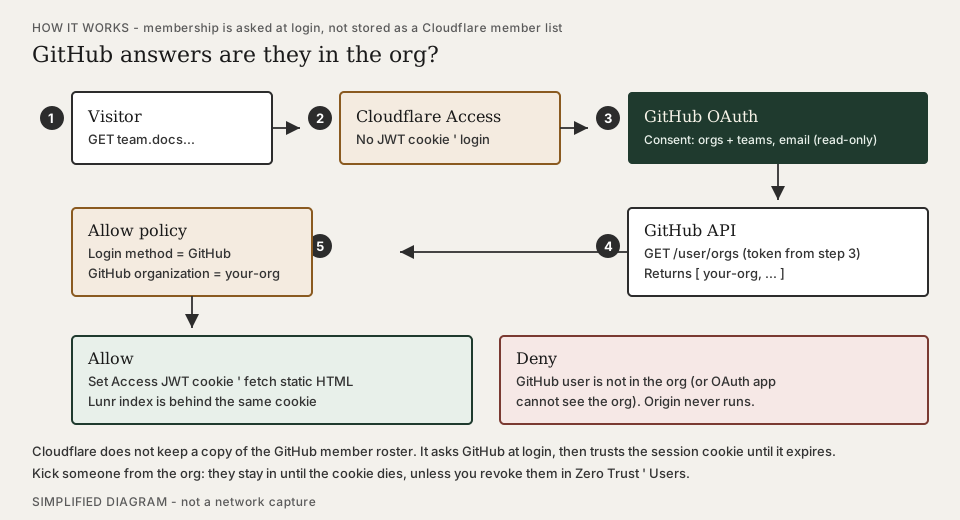
Handshake
-
You register a GitHub OAuth App (org-owned is best) and paste its Client ID / secret into Zero Trust as the GitHub identity provider. Homepage and callback URLs are the Zero Trust team domain (
https://<team-name>.cloudflareaccess.com), not the docs hostname. Mocks: How-to · GitHub as IdP. -
The first Authorize grants Cloudflare Access read-only organizations and teams plus read-only email. Those are GitHub’s
read:organduser:emailscopes. -
A visitor hits the member hostname. Access has no JWT cookie, so it sends them to GitHub’s login / consent screen.
-
GitHub authenticates them and (if they approve) hands Access a short-lived token.
-
Access calls GitHub’s API with that token (
GET /user/orgs, and teams when the policy asks) and builds an identity: GitHub user, email, org list, team list. -
The Access Allow rule is "login method = GitHub and GitHub organization =
your-org`" (optionally a team). If `your-orgis in that list, Access sets a JWT cookie and the static HTML loads. If not, deny — the origin never runs.
sequenceDiagram
  participant V as Visitor
  participant A as Cloudflare Access
  participant G as GitHub
  participant O as Static origin
  V->>A: GET https://team.docs...
  A-->>V: Access login (no JWT)
  V->>G: OAuth (orgs + teams, email)
  G-->>A: token
  A->>G: GET /user/orgs
  G-->>A: [your-org, ...]
  alt org matches Allow policy
    A-->>V: JWT cookie
    V->>O: GET (cookie)
    O-->>V: HTML
  else not in org
    A-->>V: deny
  end
GitHub login without an org (or team) rule would let any GitHub user in. The organization selector is the gate. You do not need a GitHub organization to use GitHub as an IdP at all — but then you must gate on email or another selector.
Session vs live membership
Access does not re-query GitHub on every page view. Membership is checked when the person signs in. Kick them from the org and they stay in until the Access session expires, unless you revoke the user under Zero Trust Team & Resources → Users.
If someone joins the org after a failed login, GitHub may keep serving the old (empty) org list until they revoke the OAuth app under GitHub Settings → Applications and sign in again. Cloudflare documents this under the GitHub IdP troubleshooting notes.
When GitHub will not tell Access
If the GitHub organization restricts third-party OAuth apps, an org owner must approve this OAuth app or Access cannot see membership — people in the org still look like outsiders. Approve the app under the org’s Third-party access / OAuth app policy, then have readers sign in again.
Consent lists every org you are in
Authorize is not "pick the Access Allow org." Cloudflare requested read:org, so GitHub shows all orgs on the operator’s (or reader’s) account. An org-owned OAuth App is auto-granted for its owner org. Orgs without OAuth App access restrictions may appear as already granted when any member authorizes the app — that does not put those orgs' members through Access. The Allow policy still matches one org slug. Operator how-to: Other orgs on the Authorize screen.
What agents cannot automate
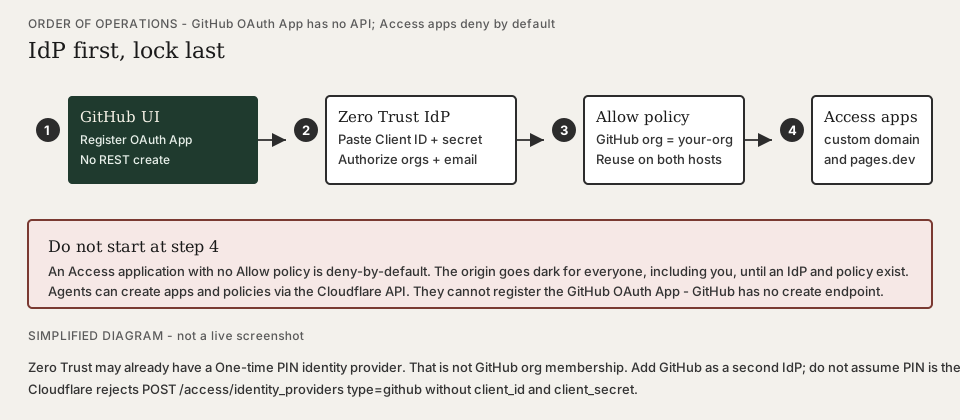
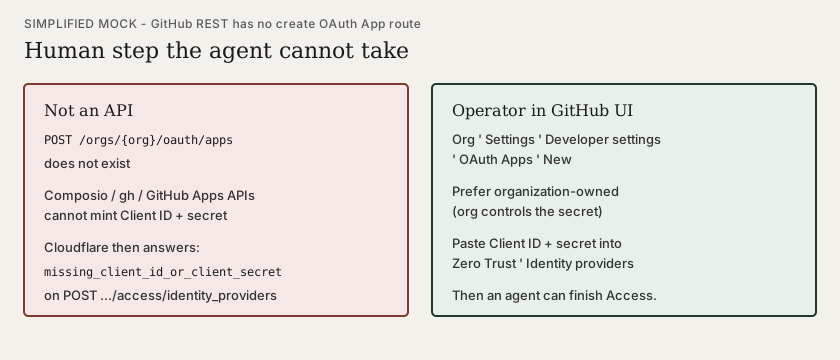
The GitHub OAuth App is a dashboard object. GitHub’s REST API has no "create OAuth App" route. An agent with a working GitHub connection can list org members and still cannot mint client_id / client_secret. Cloudflare then refuses the GitHub identity provider: missing_client_id_or_client_secret.
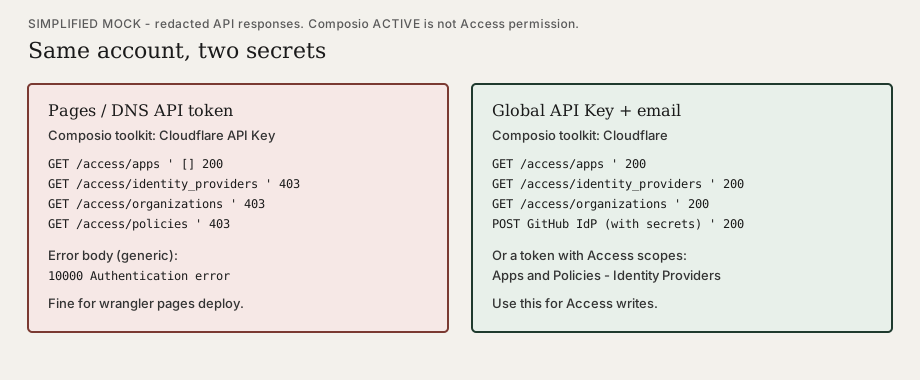
A Pages-scoped API token (typical CI secret for wrangler pages deploy) is a second trap. It may list Access applications as an empty array (200) and still return 403 Authentication error on identity providers, organizations, and policies. Access writes need the Global API Key (plus account email) or a token that includes Access Apps/Policies and Identity Providers. In Composio those are two different toolkits: Connect Cloudflare in Composio.
Do not attach Access applications to live hostnames until the GitHub IdP and Allow policy exist. Applications deny by default.
Creating the GitHub IdP via API is still not the last human step. POST …/identity_providers can succeed (200) and return messages: "Finish enterprise enablement by going to https://<team-name>.cloudflareaccess.com/cdn-cgi/access/enterprise-setup/<opaque>;." That URL is one-shot and can return Cloudflare error 500 (Internal server error, a Ray ID). A later GET on the IdP does not reissue it. The durable path is the Cloudflare dashboard (Finish setup, then Test), with GitHub already unlocked in the same browser so 2FA does not break the return. Official wording: GitHub identity provider (step "Finish setup").
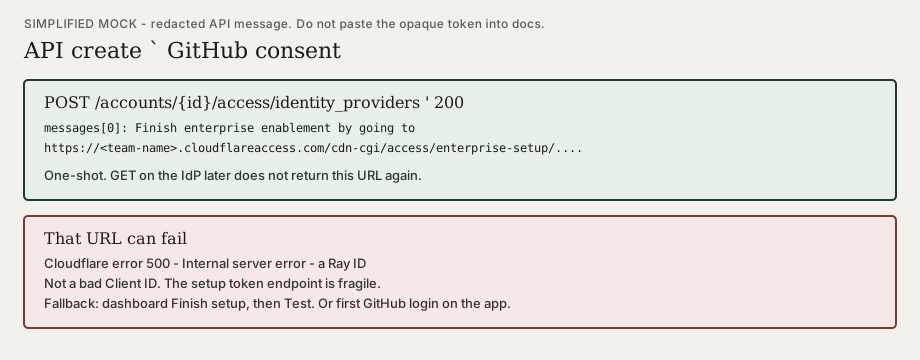
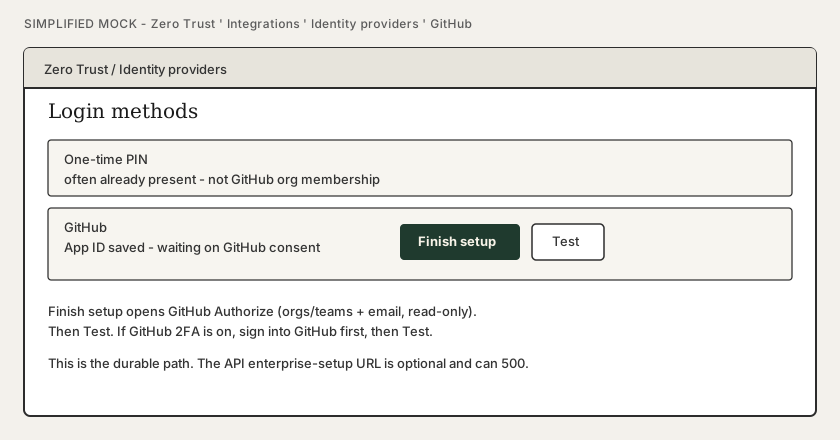
Task order and mocks: Protect a static site with Cloudflare Access · Finish GitHub setup.
What Access is not
-
Not Cloudflare account seats (people who edit DNS and Workers). Readers never need the dashboard.
-
Not encryption of the AsciiDoc in git. Do not put secrets in docs; Access is a gate.
-
Not a substitute for keeping the aggregator repo private.
Related
-
Protect a static site with Cloudflare Access — IdP, policies, seats, both hostnames, mock screens, setup order, API credential split
-
Org infra — DNS and platform resources
-
GitHub Pages custom domain — public hostname; opposite of this pattern