Connect Cloudflare in Composio
Use this when an agent needs Cloudflare DNS, zones, or Access through Composio (custom domains, team.docs hostnames, email MX, orange-cloud vs grey-cloud). MCP install is separate: Composio MCP setup.
Credential vocabulary: API key vs token. GitHub Pages + Cloudflare HTTPS: GitHub Pages custom domain.
Two Composio apps that look the same
Composio lists Cloudflare and Cloudflare API Key as nearly identical catalog entries. Tool metadata may even call the first one "OAuth." Trust the connect form, not the catalog name.
Observed connect screens (verbatim fields):
| Composio toolkit | Form asks for | Cloudflare secret that belongs there |
|---|---|---|
Cloudflare |
Global API Key and Cloudflare account email |
My Profile → API Tokens → Global API Key, plus the login email for that account |
Cloudflare API Key |
Cloudflare API token (key-only field; no email) |
A Cloudflare API Token from My Profile → API Tokens → Create Token. Not the Global API Key. |
Connect one. Putting a Global API Key into the key-only app (or an API Token into the email + Global API Key app) still shows ACTIVE, then zone calls fail with Cloudflare 9109 Invalid access token. Composio has no refresh for a wrong-kind secret. Disconnect and reconnect on the matching toolkit.
Why 9109 happens
Cloudflare’s HTTP auth is two different schemes:
-
Global API Key —
X-Auth-Email+X-Auth-Key. Needs the email. That is the Cloudflare Composio app. -
API Token —
Authorization: Bearer …. No email. That is the Cloudflare API Key Composio app.
Send a Global API Key as a Bearer token (or a token as X-Auth-Key without email) and Cloudflare answers 9109.
Architectural types (API key vs token): both of these dashboard secrets are API keys (long-lived). Cloudflare’s "API Token" is a scoped API key, not an OAuth access token. Composio may still file the first toolkit under an "OAuth" slug.
- Minimum scopes for DNS work on an API Token
-
Zone:Readto list;Zone:Edit(DNS) to create/update records.
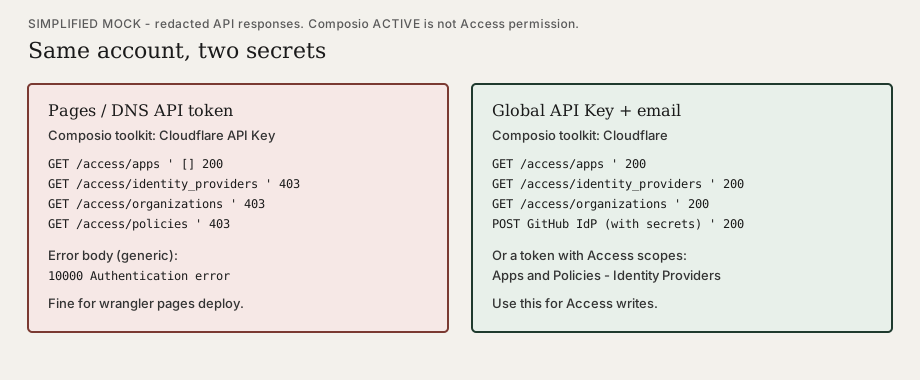
Access is a different permission set. A Pages-scoped token (typical wrangler pages deploy secret) can look healthy and still fail Access:
-
GET /accounts/{account_id}/access/apps→200with an empty list -
GET …/access/identity_providers,…/organizations,…/policies→403/10000 Authentication error
Use the Cloudflare toolkit (Global API Key + email) for Access writes, or mint a token that includes Access: Apps and Policies and Access: Organizations / Identity Providers. Do not create Access applications until a GitHub identity provider exists (GitHub OAuth Apps have no create API — an operator pastes Client ID/secret). Order and mocks: Protect a static site with Cloudflare Access · Agents and API credentials.
ACTIVE is not a smoke test
Composio ACTIVE means "we stored something." It does not mean Cloudflare accepted it.
-
After connect, run a real list: zones for the intended domain (e.g.
devcentr.org). -
Success: zone
id,name,status. -
9109 Invalid access token— wrong toolkit or wrong secret kind. Match the table above. -
10502 Too many authentication failures— Cloudflare rate-limited the bad attempts. Wait several minutes; do not hammer retries.
Machine does not matter. Composio stores the credential server-side; a connection that "worked on the laptop" is the same object on every studio.
After it lists zones
Typical next steps (confirm with the user before writes):
-
List DNS records on the zone (
namefilter for the hostname). -
Create or update records only after an explicit go-ahead.
-
For GitHub Pages custom domains, keep the Pages hostname DNS-only (grey cloud) while GitHub issues Let’s Encrypt — see GitHub Pages custom domain.
Related
-
Composio MCP setup — duplicate-toolkit pattern; read the form