Protect a static site with Cloudflare Access
Use this when a static site (Antora, MkDocs, Docusaurus, a Pages Direct Upload) must be member-only. Why the lock belongs at the edge, and how GitHub org membership is checked: Access in front of static sites.
- Worked shape (Dev-Centr)
-
custom domain
team.docs.devcentr.org(orange-cloud CNAME) plus the Pages hostname*.pages.devfor the same project.
Figures on this page are simplified mocks (field labels from Cloudflare / GitHub docs as of 2026-08). They are not live dashboard captures. Secrets and team names are placeholders or bullets. Redacted API status lines are generic (403, missing_client_id_or_client_secret).
Prerequisites
-
Zone on Cloudflare; hostname proxied (orange cloud)
-
Static origin already serving HTTPS (Cloudflare Pages custom domain, or another origin behind the same zone)
-
A Zero Trust / Cloudflare One organization on the same account as the zone (dashboard: Zero Trust)
Free Zero Trust is enough for small orgs (on the order of 50 seats). A seat is consumed on first Access login, not when you type an email into a policy.
Zero Trust may already exist on the account (a team domain like https://<team-name>.cloudflareaccess.com, and often a default One-time PIN identity provider). PIN is not GitHub org membership. Add GitHub as its own IdP.
Order of operations
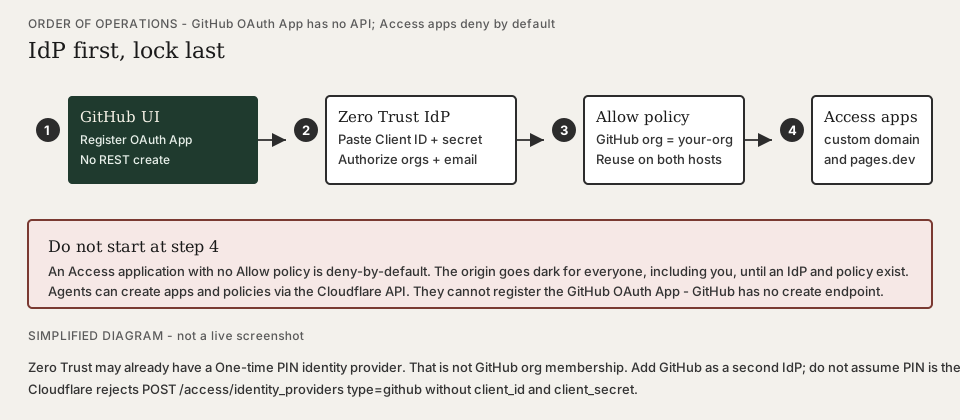
Access applications deny by default. Create the GitHub (or PIN) identity provider and the Allow policy before you attach applications to live hostnames. Otherwise the origin goes dark for everyone, including you, until a policy exists.
-
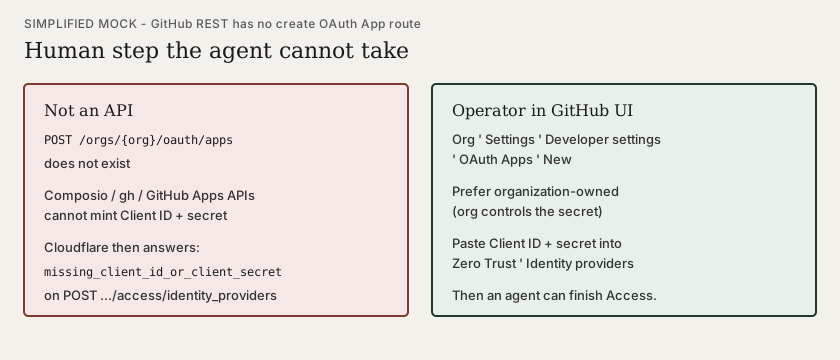
Register a GitHub OAuth App in GitHub’s UI. GitHub has no REST route to create OAuth Apps. Agents (Composio,
gh, GitHub Apps APIs) cannot mint the Client ID and secret. -
Add GitHub as a Zero Trust identity provider (paste those secrets). Cloudflare rejects
POST /accounts/{account_id}/access/identity_providerswithtype: githubifclient_idorclient_secretis missing. -
Finish setup in the dashboard (GitHub Authorize: orgs/teams + email). Do not rely on the API
enterprise-setupURL — it can 500. Finish GitHub setup. -
Write the Allow policy (GitHub organization =
your-org). -
Then create Access applications on the custom domain and
*.pages.dev.
Protect every public hostname
Access on the pretty domain is not enough. Also cover:
-
The custom domain (
team.docs.example.org) -
The Pages project hostname (
project.pages.dev) -
Preview / alias hosts (
*.project.pages.dev) if those URLs exist
Create one Access application per hostname (or a wildcard application where Cloudflare allows it). Same Allow policy on all of them.
Find the Zero Trust team name
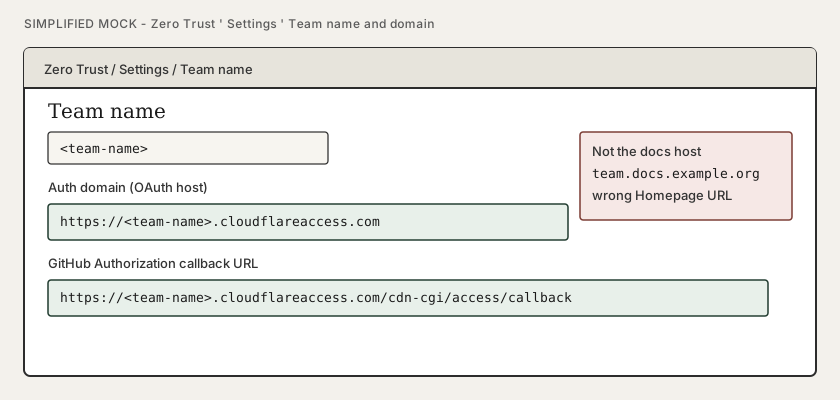
The GitHub OAuth Homepage URL and callback are the Zero Trust team domain, not the docs hostname.
-
Open Zero Trust → Settings → Team name (wording may be Team name and domain).
-
Copy
<team-name>. Auth domain:https://<team-name>.cloudflareaccess.com.
Choose how people prove who they are
You do not create a username in Cloudflare for each reader. They sign in with an identity provider (IdP). Pick one primary method so the login page is not a menu.
| IdP | Who already has an account | Policy you write |
|---|---|---|
GitHub (default for forge-centric orgs) |
A GitHub user. You invite them to the GitHub organization (or a team). |
Allow when login method is GitHub and GitHub organization is |
A Google account, or a Google Workspace user you created in Admin. |
Allow emails ending in |
|
One-time PIN |
An inbox. No GitHub/Google app to register. |
Allow specific email addresses. Cloudflare emails a 10-minute PIN; it only sends mail if the address is already allowed. |
One-time PIN is the fastest spike. GitHub org membership is the durable default when the same people already have forge access.
GitHub as IdP
-
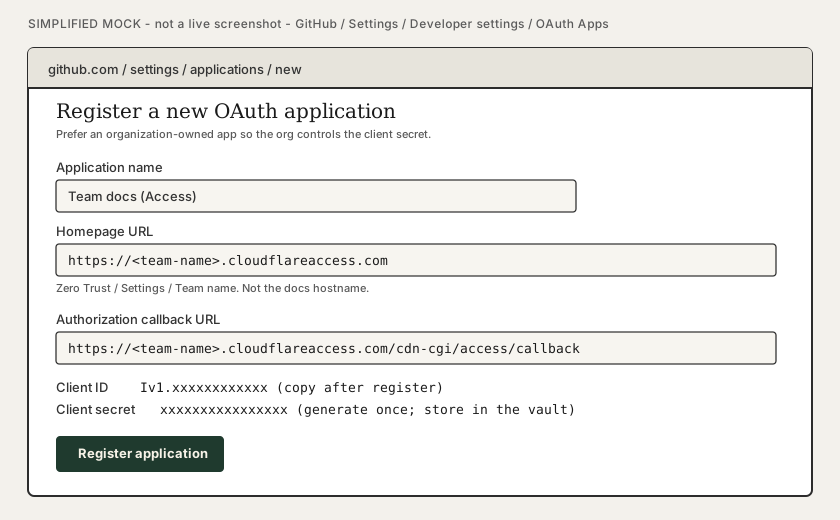
In GitHub: organization Settings → Developer settings → OAuth Apps → Register a new application (prefer an organization-owned app so the org controls the secret). User-owned apps work; they are harder to hand off.
-
Application name: something readers will see on GitHub’s consent screen (
Team docs (Access)). -
Homepage URL:
https://<team-name>.cloudflareaccess.com -
Authorization callback URL:
https://<team-name>.cloudflareaccess.com/cdn-cgi/access/callback -
Copy Client ID. Generate a Client secret (shown once).
-
In Zero Trust: Integrations → Identity providers → Add → GitHub. Paste the credentials and Save.
-
Finish setup (dashboard) — GitHub consent. See Finish GitHub setup (human consent). Agents that
POSTthe IdP skip this UI and get a fragile one-time URL instead. -
Test the login method (same browser order as Finish setup).
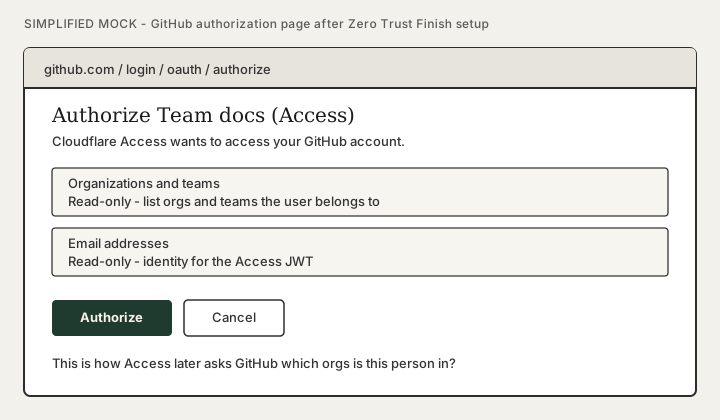
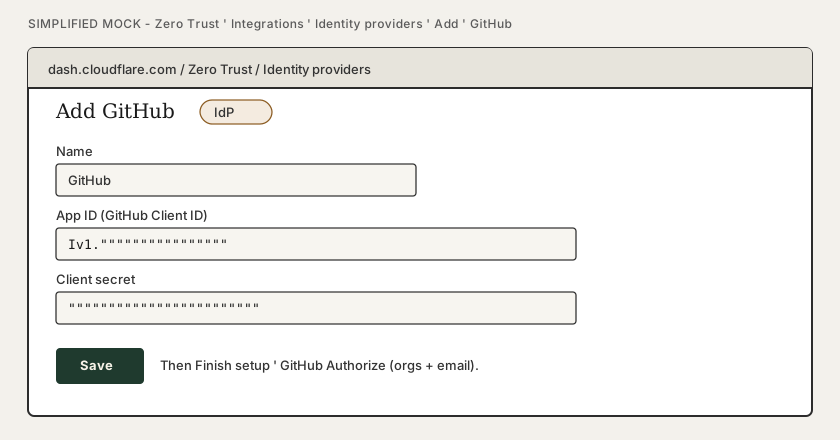
Finish GitHub setup (human consent)
Saving the IdP stores Client ID and secret. It does not grant Cloudflare read:org. Someone who can authorize the OAuth App must still click through GitHub.
- Browser order (both accounts)
-
-
Sign into the Cloudflare dashboard (Zero Trust lives there).
-
In the same browser, unlock GitHub (complete 2FA if prompted) so Authorize does not interrupt the return to Cloudflare.
-
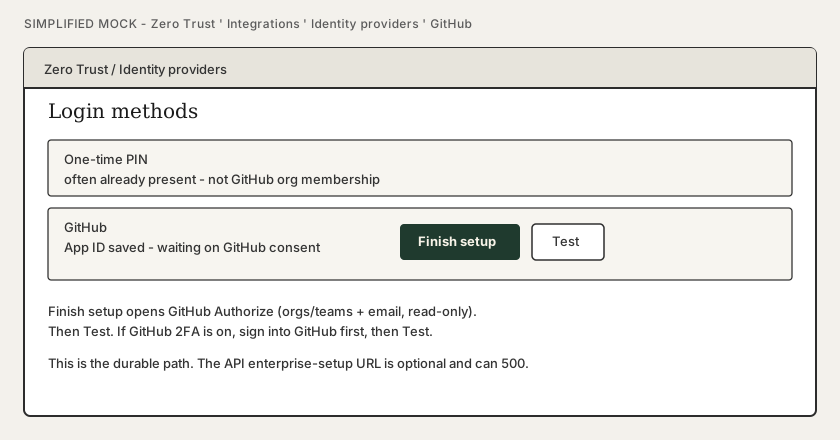
Open Zero Trust → Integrations → Identity providers → GitHub → Finish setup.
-
On GitHub: Authorize organizations and teams (read-only) and email (read-only).
-
Back in Zero Trust: Test.
-
"Sign into GitHub first" alone is not enough — you still open Zero Trust as a Cloudflare operator. GitHub unlocked in the same browser is the Cloudflare GitHub-IdP tip for 2FA.
API create (POST /accounts/{account_id}/access/identity_providers) may also return a messages entry:
Finish enterprise enablement by going to
https://<team-name>.cloudflareaccess.com/cdn-cgi/access/enterprise-setup/<opaque>
Treat that URL as optional. It is one-shot (a later GET on the IdP does not return it). It can answer Cloudflare error 500 / Internal server error (a Ray ID, not a useful body). That is a broken setup token, not a wrong Client ID.
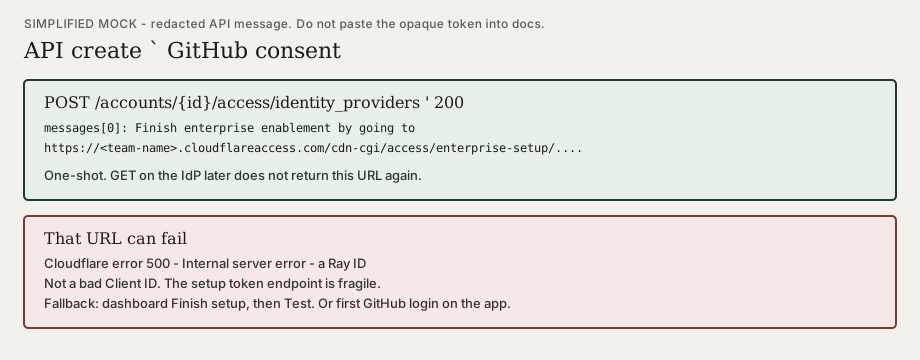
If the one-time URL 500s: ignore it. Use Finish setup in the dashboard, or open the protected hostname in a logged-out browser and complete GitHub Authorize there (with GitHub already unlocked if 2FA is on).
Other orgs on the Authorize screen
GitHub’s consent page lists every organization you belong to, not only the org in the Access Allow policy. Cloudflare asked for read:org; the screen is "which of your orgs may this OAuth App see?"
-
An organization-owned OAuth App is auto-granted for the owning org — expected.
-
Orgs that do not have OAuth App access restrictions may show as already granted when any member authorizes the app. That is GitHub’s default when restrictions are off (common on older orgs). Newer orgs often enable restrictions by default.
-
Extra orgs on that screen do not admit their members to the member docs. The Access policy still requires GitHub organization =
your-org. -
To stop auto-grant on an unrelated org: that org’s Settings → Third-party access → revoke the app, then enable OAuth App access restrictions. Deny / uncheck the org on Authorize when GitHub still offers a choice.
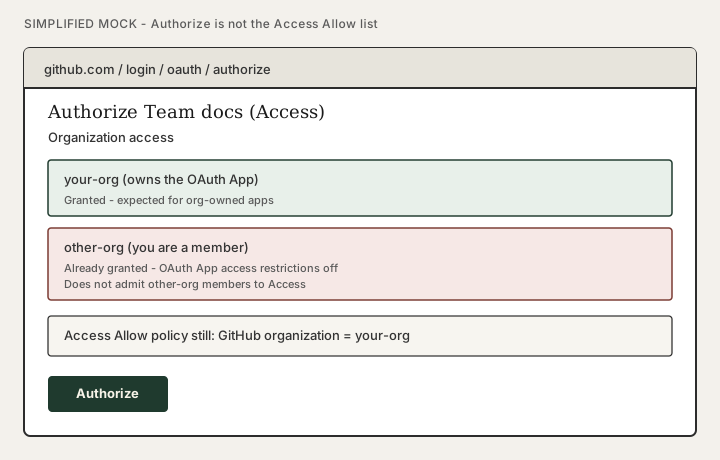
If the gate org restricts third-party OAuth apps, an org owner must approve this app or Access cannot see membership. Why that matters: How Cloudflare learns GitHub org membership.
Allow policy
-
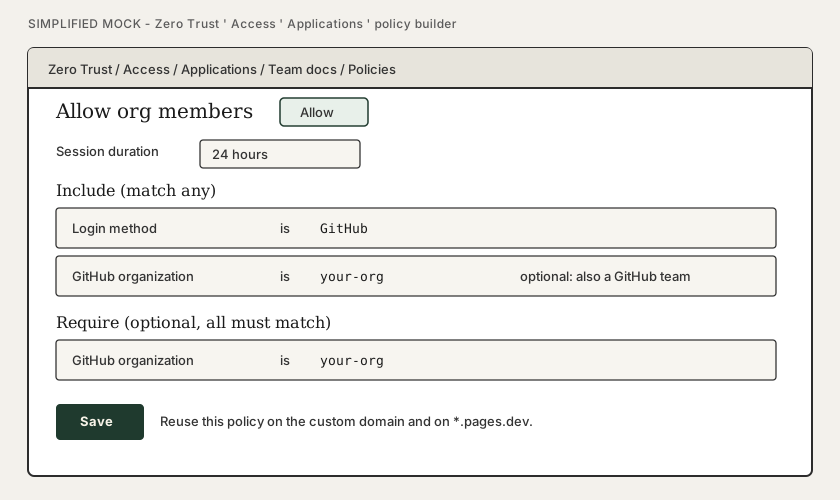
On the application (or under reusable policies), Add a policy.
-
Action: Allow.
-
Include (GitHub path): login method GitHub, and GitHub organization = your org slug.
-
Include (PIN / Google path): Emails or Emails ending in.
-
Optional Require: the same GitHub org, so a personal GitHub login that is not in the org cannot sneak through an overly broad Include.
Reuse the policy (or an Access Group of emails) on the pages.dev application so you do not maintain two allowlists.
Create the Access application
Do this after the GitHub IdP and Allow policy exist.
-
Open Zero Trust → Access → Applications → Add an application.
-
Choose Self-hosted.
-
Application name: something operators will recognize (
Team docs). -
Public hostname: the custom domain. Repeat for
pages.dev. -
Session duration: hours to a day is typical for docs; shorter if the content is sensitive.
-
Attach the Allow policy from the previous section.
Until these applications exist, the origin is world-readable even if the git repo is private. Treat the hostname as unpublished.
Set up user accounts
This is the part that is easy to overbuild.
Readers (the member site)
| You do | You do not |
|---|---|
Invite them to the GitHub org (Member is enough) — or add their email to the Access policy |
Add them as a Cloudflare account member (that is for people who change DNS, Pages, and Workers) |
Tell them the URL. First visit: Access login → GitHub / Google / PIN → the docs |
Create an Antora, Pages, or "docs app" user table |
After first successful login they appear under Zero Trust Team & Resources → Users and consume one seat |
Hand them the Global API Key or a Pages deploy token |
GitHub path, in order:
-
They create a GitHub account if they do not have one (github.com signup — not Cloudflare).
-
An org owner invites them to
your-org(and to a team if the policy requires a team). -
They accept the invite.
-
They open the member hostname and complete GitHub OAuth for the Access app (once).
-
Later visits use the Access session cookie until it expires.
PIN path: add the address to the Allow policy, send them the URL, they request a code. No dashboard user is created for them unless they are also an operator.
Operators (Cloudflare dashboard)
Only people who must edit zones, Pages projects, or Access policies need a Cloudflare account invitation (Super Administrator / appropriate role). That list is much smaller than "everyone who reads team docs."
Removing someone
-
GitHub path: remove them from the org (or the required team). Existing Access cookies last until the session expires; you can revoke the user in Zero Trust Users if you need them out immediately.
-
PIN / email path: delete the address from the policy (and revoke the Zero Trust user).
-
Do not leave them in the GitHub org if org membership is the only gate.
If they joined the org after a failed Access login, have them revoke the OAuth app under GitHub Settings → Applications and sign in again so GitHub sends a fresh org list.
Seats
-
First Access authentication creates an active Zero Trust user and takes a seat.
-
One person, many devices, still one seat.
-
Free plan: further logins are blocked when seats are full (not silently billed). Reclaim seats by removing users or enabling inactivity expiry (months, configurable).
-
CI that must fetch the protected site should use an Access service token, not a human seat.
Agents and API credentials
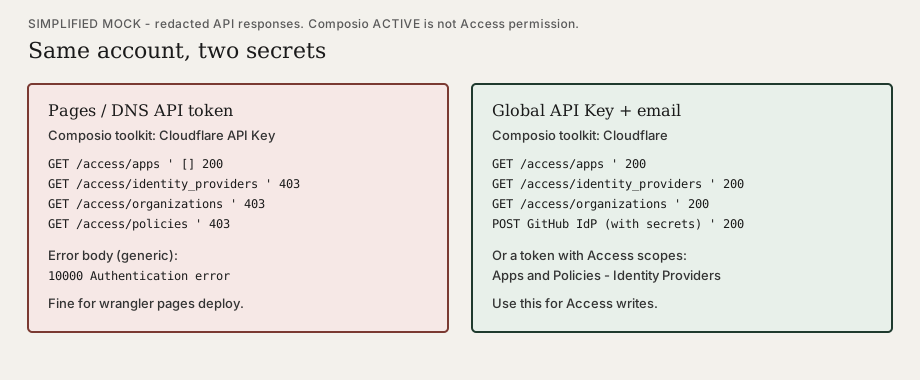
Composio (and wrangler) can list zones and deploy Pages with a Pages-scoped API token. That token is not enough to set up Access.
Typical split:
| Secret | What it can do |
|---|---|
API token: Pages Write (+ Account Settings Read) |
|
Global API Key + account email, or an API token with Access: Apps and Policies and Access: Organizations / Identity Providers |
List IdPs, create GitHub IdP (once you have OAuth secrets), create policies and applications. |
GitHub personal access token / Composio GitHub |
List org members. Cannot register an OAuth App. |
In Composio, that is the Cloudflare toolkit (Global API Key + email), not Cloudflare API Key (token-only). Catalog names lie; match the connect form: Connect Cloudflare in Composio.
Do not create Access applications from an agent until the GitHub IdP exists. Deny-by-default will lock the hostname with no GitHub login button that can succeed.
Check that it is actually closed
-
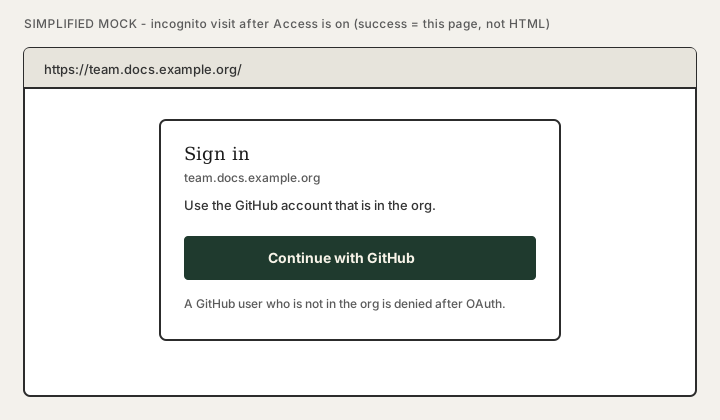
Incognito / logged-out browser:
https://your.custom.domain/→ Access login (Continue with GitHub), not HTML. -
Same for
https://your-project.pages.dev/. -
A member who matches the policy gets through and can use Lunr search (the index is behind Access too).
-
A GitHub user not in the org (or an email not on the list) sees the Access deny page.
Related
-
Access in front of static sites — why the lock is at the edge; how GitHub org membership is checked; what agents cannot automate
-
GitHub Pages custom domain — public sites; grey-cloud for GitHub’s certificate
-
Connect Cloudflare in Composio — DNS/Access API credentials for agents