Google Cloud projects as OAuth boundaries
People arrive at Google Cloud Console with a simple picture: my Google account, the apps I trust, and what each app may do with my Drive / Gmail / Calendar.
Google Cloud answers with a different noun: the Project. Consent screens, API enablement, and quotas all hang off that Project. Client IDs are children of it. Personal "just let Composio read my Drive" work gets the same enterprise workflow Fortune 500 teams use for VMs and billing.
This page names the mismatch, shows an ideal model, then shows how to map today’s console onto that model without pretending the schema is fine.
- Task guide (steps only)
- Lookup table
- Companion essay
Ideal mental model
What you actually care about as a person wiring tools:
| Concept | Job |
|---|---|
You (account) |
Identity and the data (Drive, mail, calendar). Quotas for "access my stuff" could live here. |
App |
A named trust boundary: Composio, rclone, a personal web app. Own branding, own consent copy, own scope set. |
Client credentials |
How that app proves itself during OAuth (Client ID / secret, redirect URIs). |
Grant (token) |
What you approved this app to do, for this session / refresh chain. |
flowchart TB
  You["You (Google account + your data)"]
  subgraph Apps["Apps directory (ideal)"]
    A1["App: Composio\nconsent / scopes / branding"]
    A2["App: rclone\nconsent / scopes / branding"]
    A3["App: personal script\nconsent / scopes / branding"]
  end
  You -->|authorize grant| A1
  You -->|authorize grant| A2
  You -->|authorize grant| A3
  A1 --> C1[Client ID + secret]
  A2 --> C2[Client ID + secret]
  A3 --> C3[Client ID + secret]
In this world you would not invent a new "Personal 2.0" project every time you add a sync tool. Apps would be first-class. Infrastructure projects (VMs, BigQuery, Cloud Run) would be optional and separate.
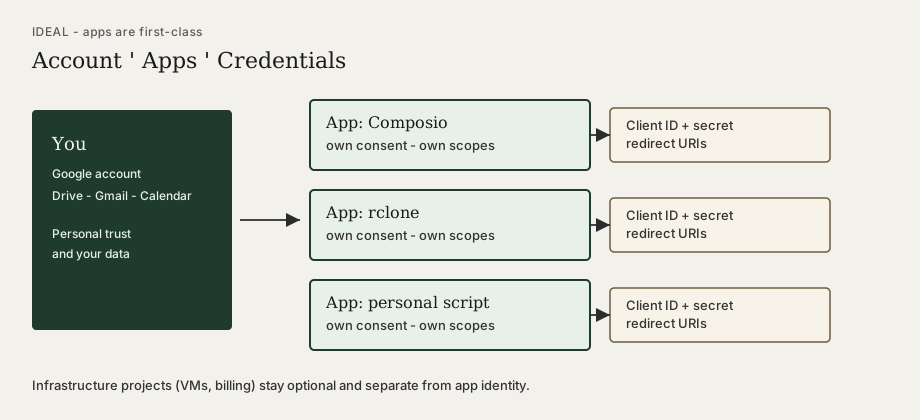
What Google Cloud actually couples
In the Console today, several concerns that feel like "app" properties are project-wide:
| Concern | Ideal owner | Actual GCP owner |
|---|---|---|
OAuth consent screen (name, support email, scopes list) |
App |
Project (one screen shared by every Client ID in that project) |
API enablement (Drive, Gmail, …) |
App or client |
Project |
API quotas / rate limits |
App or user sandbox |
Project |
OAuth Client ID + redirect URIs |
App |
Credential under Project (but consent still project-wide) |
Billing / IAM for cloud resources |
Infrastructure project |
Project (same object) |
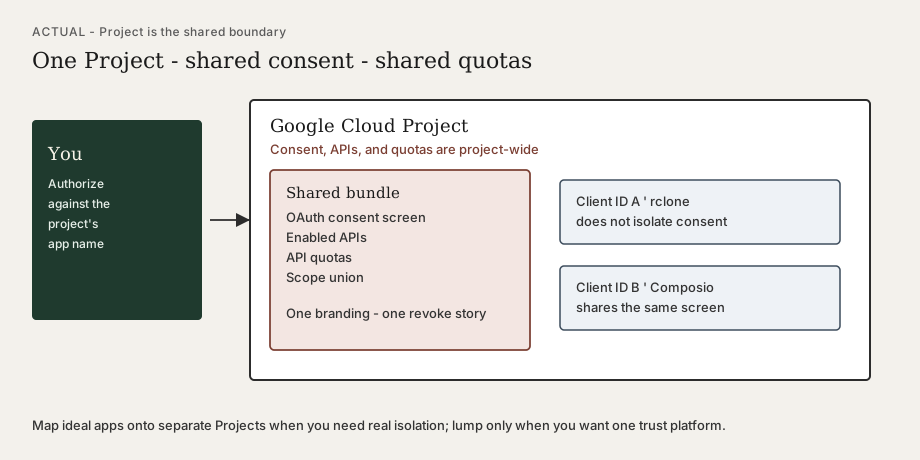
flowchart TB
  subgraph Proj["Google Cloud Project (actual)"]
    Consent["OAuth consent screen\n(shared)"]
    APIs["Enabled APIs"]
    Quota["API quotas"]
    Creds["OAuth Client IDs"]
    Consent --- Creds
    APIs --- Quota
  end
  User[Your Google account]
  User -->|sees project app name + union of scopes| Consent
  Creds -->|Client ID A| ToolA[rclone]
  Creds -->|Client ID B| ToolB[Composio]
Consequences people feel in the UI:
-
Two Client IDs in one project still share one consent screen and the union of declared scopes.
-
Revoking or resetting trust for "that project app" can couple token lifetimes across tools you thought were separate.
-
Heavy Drive use from rclone can exhaust project quota and starve Composio (or the reverse).
-
Pure consumer workflows (NotebookLM context via Drive) still require a Project, consent screen, and Client ID—there is no personal API sandbox.
Mapping ideal → Console (without self-deception)
Keep the ideal nouns in your head. Label Projects as stand-ins for apps (or for trust platforms), not as "folders for personal stuff."
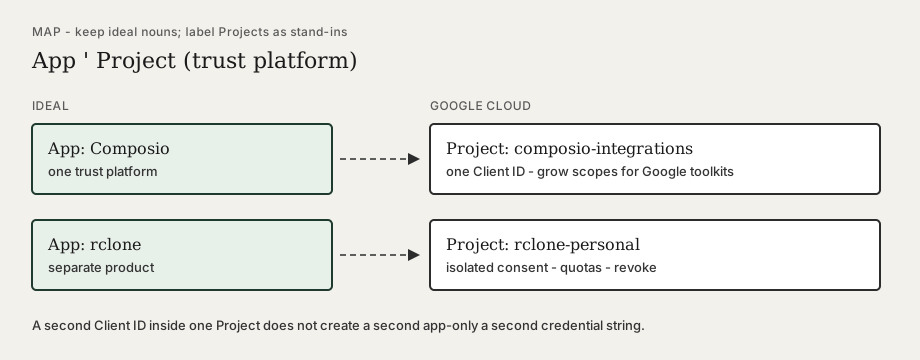
flowchart LR
  subgraph Ideal["Ideal"]
    I1[App: Composio]
    I2[App: rclone]
  end
  subgraph Map["Map onto GCP"]
    P1["Project: composio-integrations\n= trust platform for Composio"]
    P2["Project: rclone-personal\n= trust platform for rclone"]
  end
  I1 -.->|one project per trust boundary| P1
  I2 -.->|separate project| P2
Practical mapping rules:
| Ideal intent | What to create in GCP |
|---|---|
One trust platform (e.g. all Google tools inside Composio) |
One Project + one OAuth Client ID; grow scopes/APIs as you add Gmail, Calendar, Drive, … |
A different product with its own brand and revoke story (rclone, a hobby web app) |
A separate Project (and its own Client ID) |
Only cloud VMs / billing / IaC |
A Project used as real infrastructure—do not overload it as an OAuth app unless you accept coupling |
"Personal catch-all" |
Avoid. That is how consent names, scopes, quotas, and revokes tangle. |
Lumping vs splitting
Lump when the tools share a platform and you want one mental revoke surface (recommended for "everything Google inside Composio"): same Project, same Client ID, enable APIs and add scopes as you grow, then re-authorize so tokens pick up new scopes.
Split when products are unrelated (rclone sync vs Composio agent tools): separate Projects so consent branding, scope unions, quotas, and revocation stay independent.
Do not put a second Client ID in an existing "Personal" project and assume isolation. You only isolated the credential string—not consent, quotas, or API enablement.
Scopes, APIs, and lookalike traps
-
Enable the consumer API you actually call. NotebookLM-style access to docs in Drive uses Google Drive API, not Vertex AI Workbench / "Enterprise Notebooks."
-
Consent scopes are the human-visible permission set. Enabling an API without adding scopes (and re-authorizing) does not grant access.
-
Authorized redirect URIs are required for web-style OAuth callbacks (e.g. Composio’s callback). Authorized JavaScript origins are for browser clients; leave them empty when the tool only needs a redirect URI.
-
Expanding scopes does not rewrite old tokens—open the connection again and complete OAuth.
- Detail and click-path
Related
-
Composio MCP setup — install the MCP server; use the Google OAuth how-to when Composio asks for Client ID / secret
-
API key vs token — Client ID/secret vs the user grant
-
Infrastructure as Code — when a Project really is infra